Shein Free Trial Game Plan: Smart Moves to Get Picked
Shein Free Trial Center game plan: smart applying, result tracking, 10-day review deadline and how Rewrite rescues a failed report.
Advertisement
Free Trial Center Game Plan: Sharper Moves, Better Picks
Spots are limited. A sloppy approach means the system skips your profile — so follow the steps below to the letter.
Advertisement
Independent Deal-Hunter's Guide Heads-up: everything here comes from public info on the Shein Free Trial Center. Zero official link to the brand, zero commercial ties. Competition is intense, and approval is never assured. Smart move — read each campaign's terms before you apply.
Why So Many Entries Fail
Every week, the distribution dashboard sorts through a mountain of entries. Many get dropped for an incomplete profile, late timing, a delivery address that conflicts with the store's country, or skimpy reviews with zero photos after the item lands.
Pro tip for a stronger standing: stay consistent. Complete your personal details, apply the second each window opens and deliver detailed reviews every time. Selection runs on strict criteria.
How the Sample Program Works
Think of this space as Shein's official quality-testing hub. Selected members receive items at no cost — in exchange, they agree to give an honest review after real use. Approval automatically generates a free order and dispatches it.
Slots are limited and rotate constantly. No one qualifies automatically — activity history, application speed and the quality of earlier reviews determine eligibility for future campaigns.
Categories That Pop Up Often
The selection covers several consumer segments. Inventory rotates constantly, so expect a mix of new trend pieces and reliable basics ready for review.
Apparel aside, expect frequent beauty and personal-care items, home goods and modern decorative accents.
Main Dashboard Categories:
Find the trials area
Log in via the site or mobile app and jump to the trials area. Mobile path: Profile → More Services → Other Services → Free Trial Center. Then scan this cycle's available items.
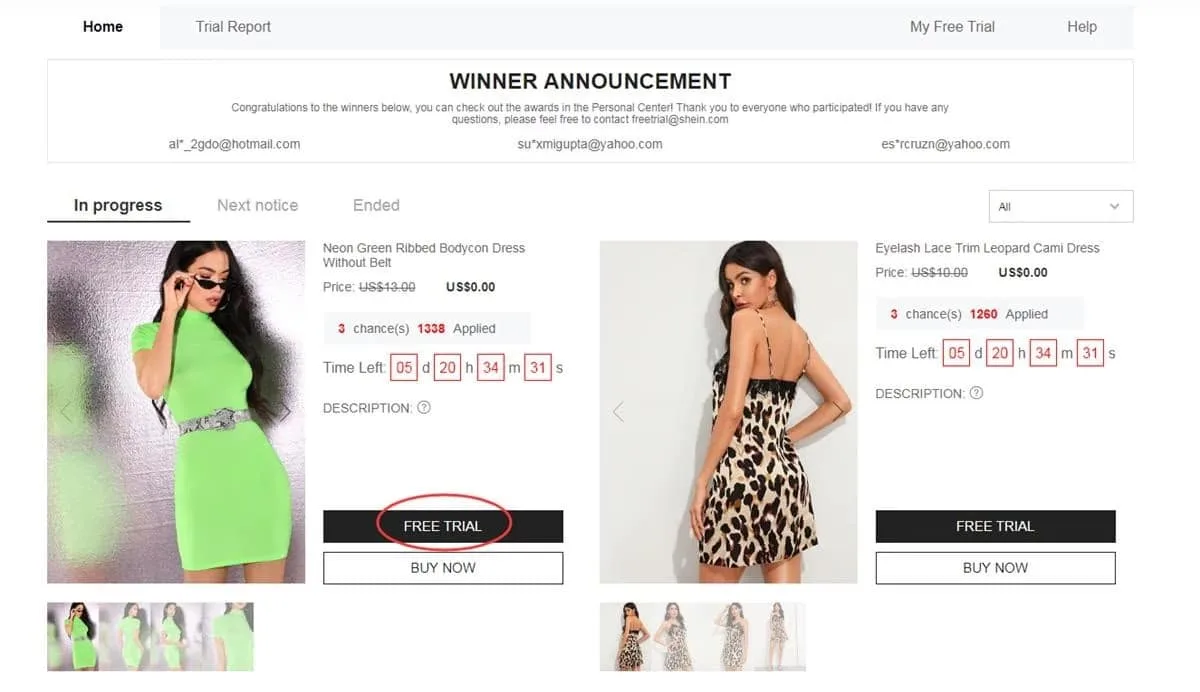
Standard path via the services menu in your account
Up to 3 picks each week
Hard limit — 3 picks a week, and unused slots expire without accumulating. Hit the trial button, choose the correct size, confirm a delivery address within the active store's country and submit. Wrong address? The request gets rejected.
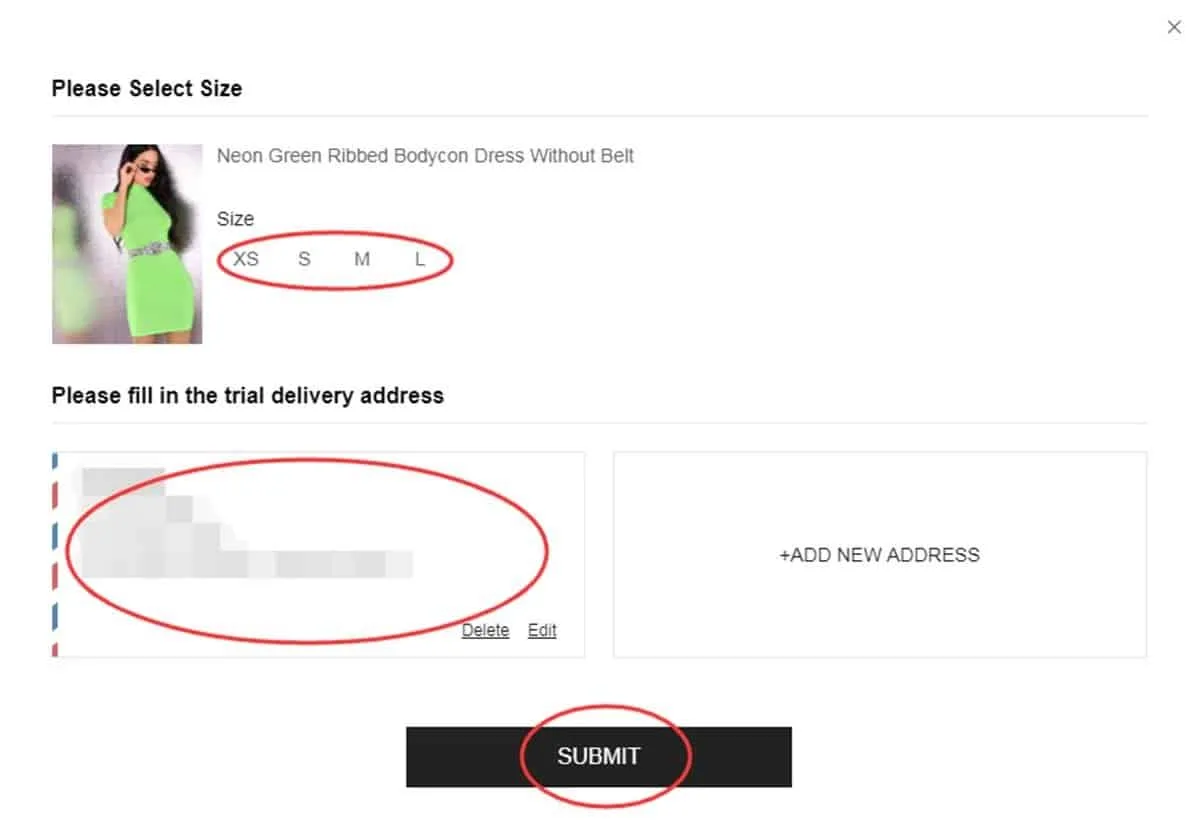
Confirming size and delivery address
Check the final result
The verdict typically lands in about a week. Status lives under “My Free Trial / My Applications”. “Approved” — you're in, and the free package is on its way. “Failed” — that request didn't make it this round.
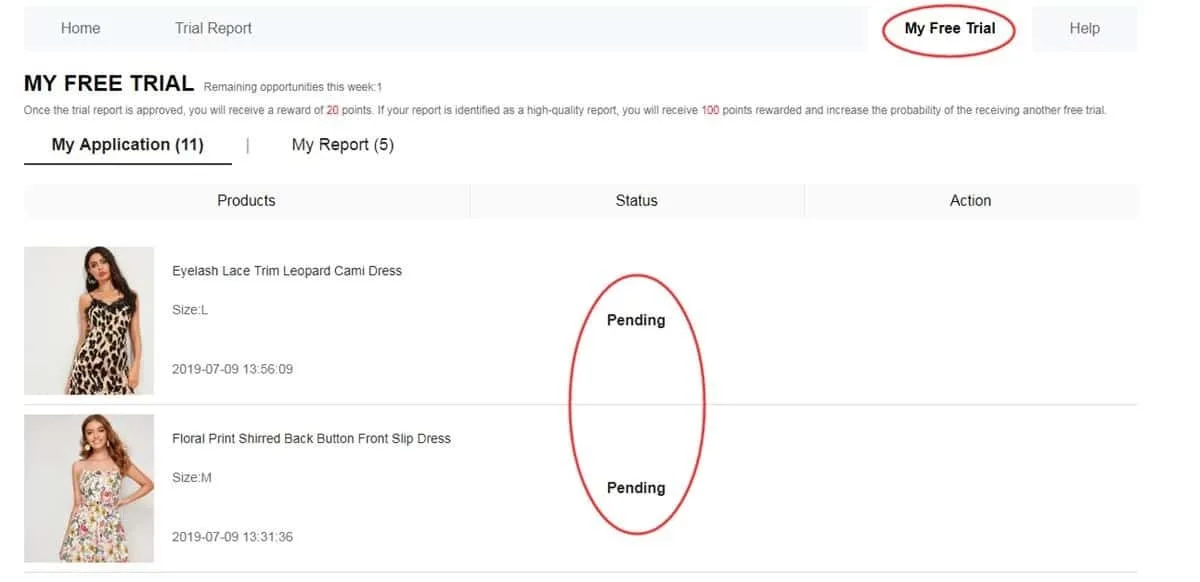
In-account tracker for approvals and rejections
Review due within 10 days
Package delivered? Use the item and rate its quality, design, fit, material and durability. Draft a detailed review with sharp photos — pro tip: one full-body shot plus two close-ups works best. Submit via the matching button, then follow it in “My Report”. Smart move: finish before day 10.
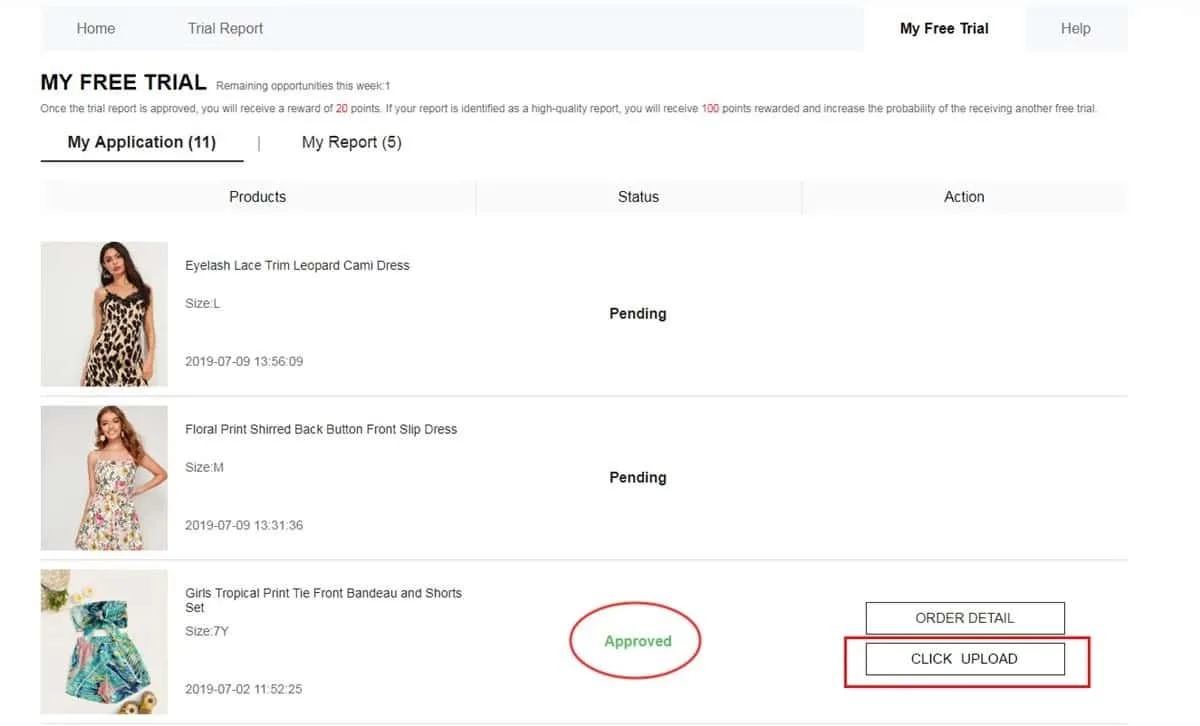
Official upload space for review text and images
Points and the My Report screen
Review submitted? Next stop: My Report — verify it registered. Approved reviews usually bring 20 points. Tagged “High-Quality Report”? That's 100 bonus points on top. Heads-up: points don't guarantee future approvals — they just reflect your activity history.
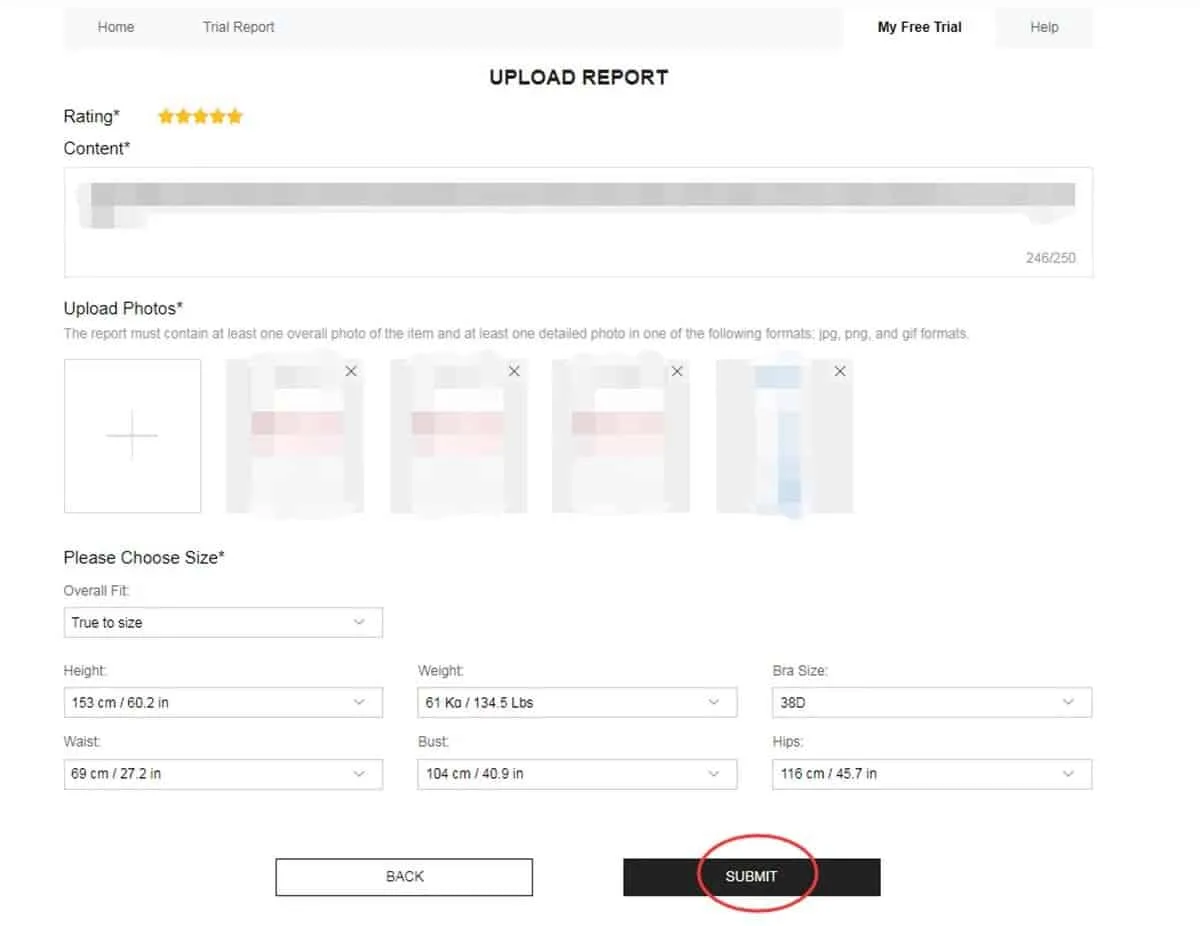
Screen with your report status and points collected
Failed report? Here's the fix
Should the report's status change to Failed, you'll usually get another chance to edit. In My Report, find the Rewrite button. Tap it, strengthen the text (quality, style, fit, material, finish), replace fuzzy photos with sharp ones and resubmit before time runs out. Pro tip: never leave a rejected report untouched — it can drag down future selections.
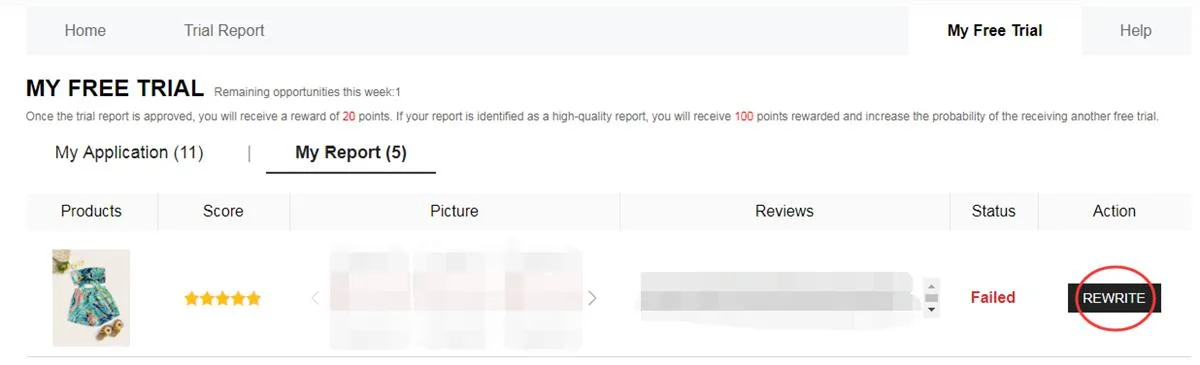
Failed status in My Report, with Rewrite ready for a resubmission
Building a Review That Lands:
Pro tip — reviews that pass moderation usually feature:
Rewards System: Approval usually means 20 points per review. Land the “High-Quality Report” label for 100 bonus points toward future orders.
Mistakes That Sink Your Chances
Dodge these errors — smart move for a healthy internal profile:
❌ An outdated account profile or body measurements left blank.
❌ Shipping to a place outside the region the active store serves.
❌ Applying late, after weekly campaigns kick off.
❌ Short, generic write-ups lacking descriptive detail or genuine photos.
❌ Overshooting the 10-day cutoff on a required write-up.
❌ Leaving a Failed write-up as-is while Rewrite sits right there.
❌ Long absences from the app, then popping back just for freebies.
Pro tip: frequent picks usually follow the same pattern — a complete profile, requests fired off as soon as weekly windows open, a verified address and punctual, detailed reviews with real photos.
— Juniprax editorial tip
Ground Rules Worth Knowing
• Max 3 tries a week — unused slots never accumulate.
• Ship only to an address inside the active web store's country — exact match required.
• Standard shipping? Covered. Customs charges? Possibly, depending on the destination.
• Reviews are due within 10 days of delivery — no exceptions.
• Failed review? Usually there's one extra chance (Rewrite) to correct it.
• Fake data or multiple accounts on a single device may lead to a permanent block.
• Delays or missing feedback cut your chances in future selections.
FAQ: Your Quick Answers
Is product shipping on my dime?
No — standard delivery costs are covered by the platform. Heads-up: customs charges or local rules in your country may still apply.
What's the item limit per request round?
Max 3 distinct items per weekly round. Leftover credits expire — no carry-over into the following cycle.
Review rejected — now what?
My Report may display Failed. Typically, Rewrite lets you correct the text and photos, then resubmit. Pro tip: reread the content and image rules first.
Do products need to be returned after the review?
Nope. Standard program rules let you keep the items once the review is submitted and approved. Still — read every campaign's terms carefully.
Hot items fill up quickly. Consistent winners check the dashboard right at each campaign launch, grab their picks fast and submit — or repair — reviews ahead of the deadline.
Jump to the Official Free Trial Center Dashboard
Check this week's available items, apply in the right sequence and track each phase closely.
HEAD TO THE FREE TRIAL CENTER NOW
You'll land safely on the platform's own official trial page.
Sources and technical help: Shein Free Trial Help Center


