Shein Free Trial Center, Decoded: A Deal-Hunter's Guide
Deal-hunter's rundown of the Shein Free Trial Center: categories, applications, request tracking, trial reports and repairing failed reviews.
Advertisement
The Free Trial Center lets you request products from select campaigns — but tapping submit on a pick is only the opening move in a longer process.
Browse the Category Lineup









Which items show up — and how many — is the program supplier's call.
Heads-up: signing up doesn't guarantee approval.
It all runs through the Shein app — you pick the items and Shein decides who gets in. Land a spot? Then it's on you to test the item and publish a review before time runs out.
Heads up: Juniprax is an independent guide, not affiliated with Shein. We don't collect your details, handle sign-ups or pick testers. Learning each step up front helps you avoid missed deadlines and similar snags.
Find the trials area first
Log in and track down the Free Trial Center. App users, tap through Profile → More Services → Other Services → Free Trial Center. Inside, every product with an active campaign is right there on screen.
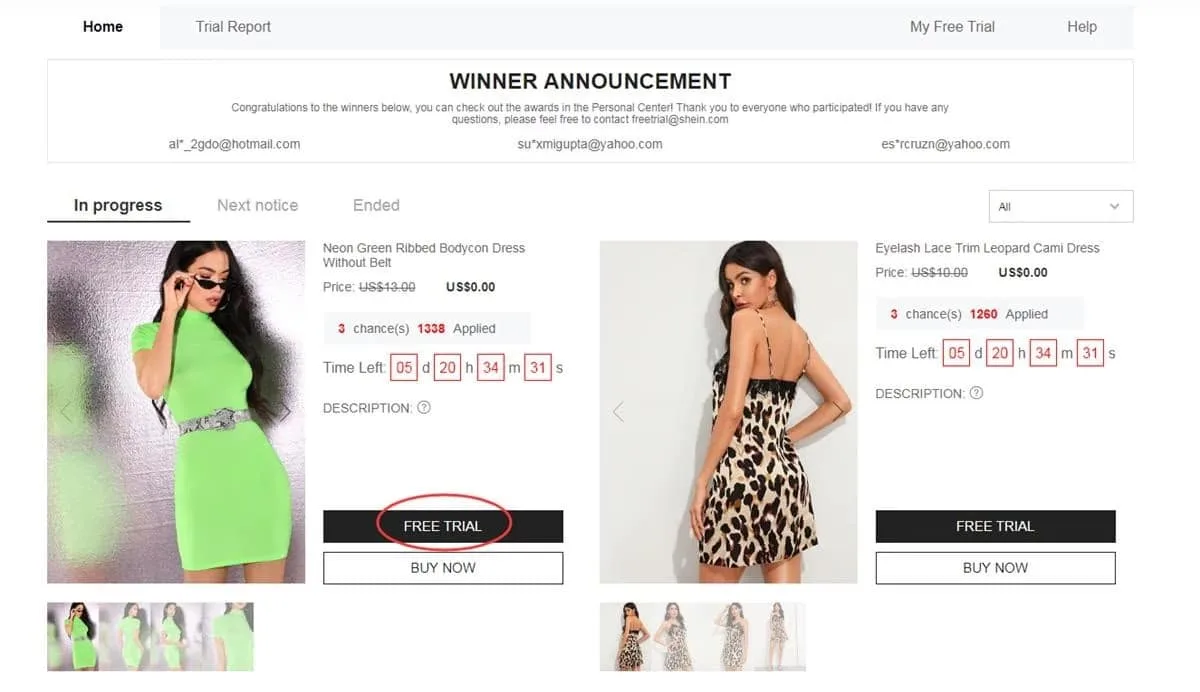
A dedicated hub lists every campaign currently taking entries
Select the products to try out
Heads-up — the limit is up to 3 applications per week, and unused slots vanish when the cycle ends. Before committing to an item, verify the size and make sure your saved address falls inside the region served by that store.
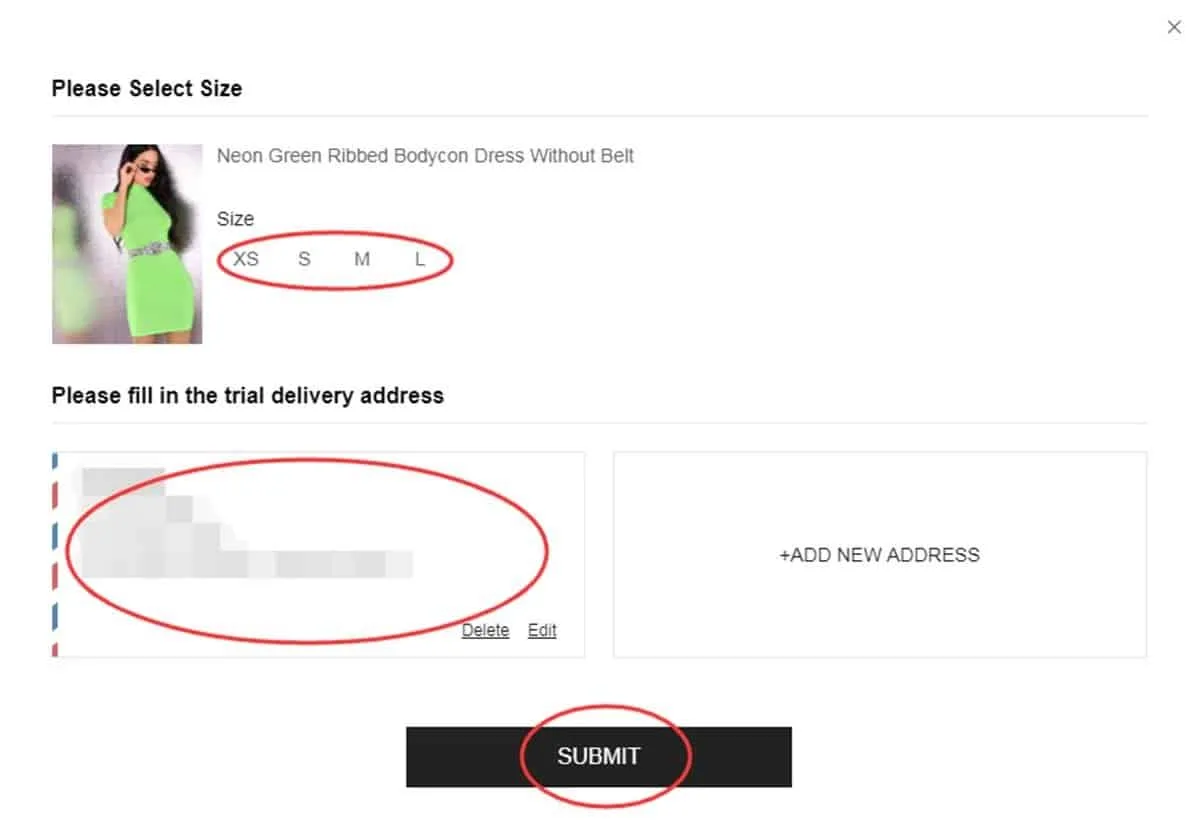
Verify the product and delivery details — then submit
Track every request's progress
Request in? Monitor it under “My Free Trial” or “My Applications”. The result usually appears in about a week. “Approved” — the trial is yours. “Failed” — no luck on that request for now.
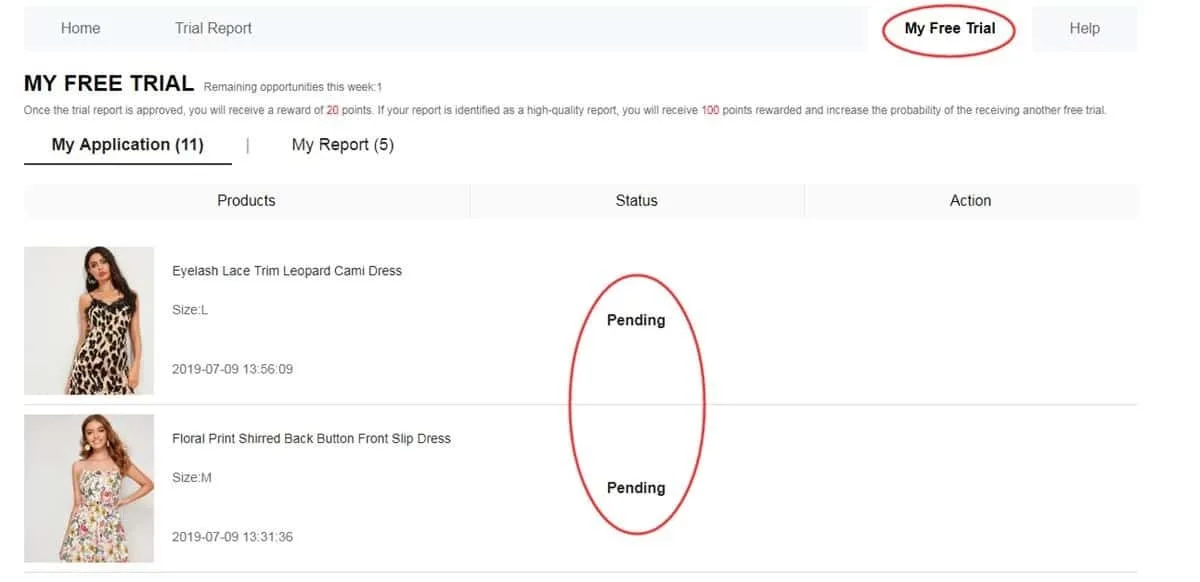
Your history reveals which entries advanced to the next round
Put the product through its paces
Approved item in hand? Use it for real before writing a word. Note the fabric, finish, comfort, fit, appearance and overall build. Stick to honest impressions, snap your own photos and file the report inside the deadline — up to 10 days.
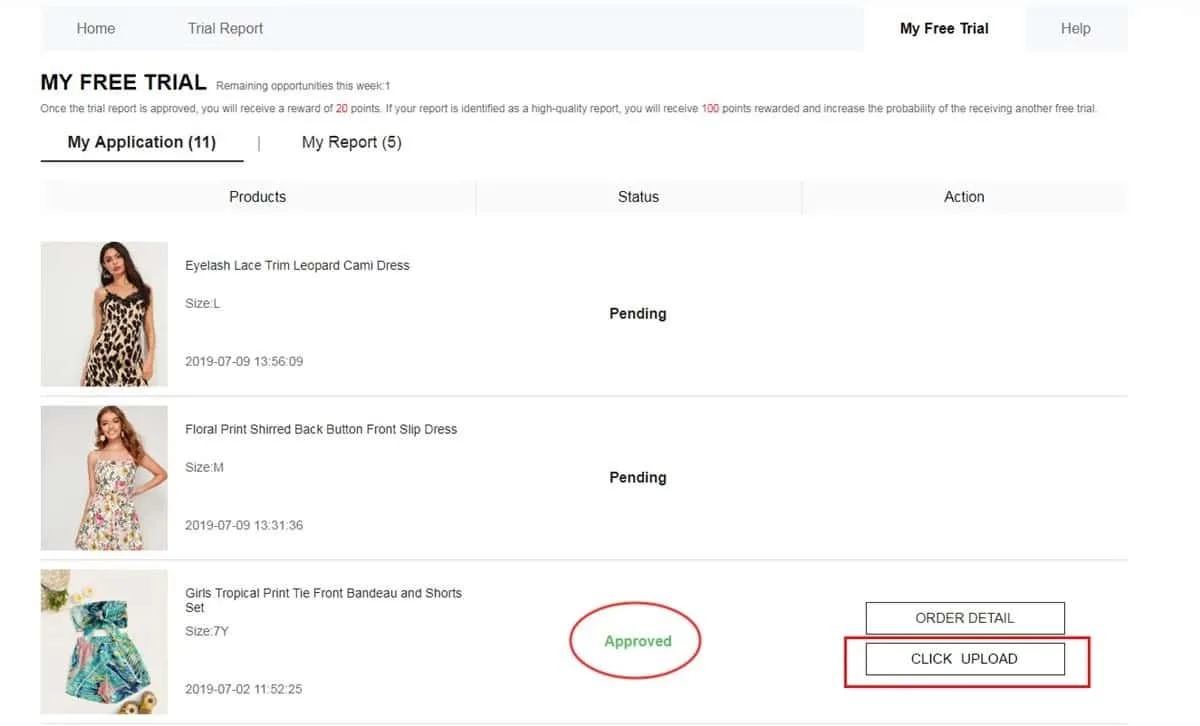
Publish a detailed write-up backed by original product shots
Check whether your report passed
Review submitted? Pop into My Report for the result. Approval usually adds 20 points to your balance. Snag the “High-Quality Report” label, too, and as many as 100 extra points may land. Heads-up: that bonus doesn't guarantee approval in future campaigns.
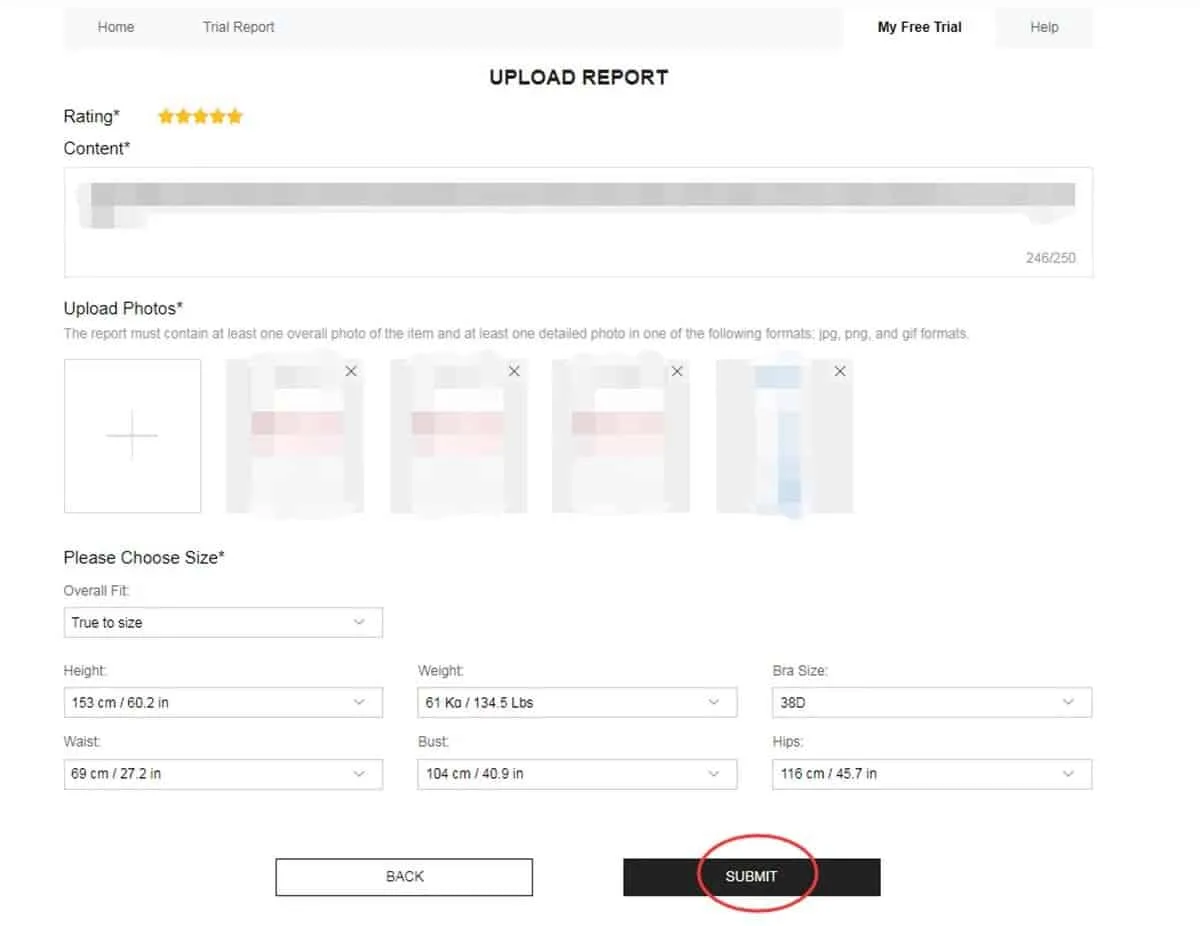
Here's the verdict on your review — plus any points it earned
Second chance on the table? Take it
Not every review clears the first pass. Report showing Failed? Hunt for the Rewrite button. Available? Polish the wording, pile on helpful specifics and replace any dark, fuzzy or unclear photos.
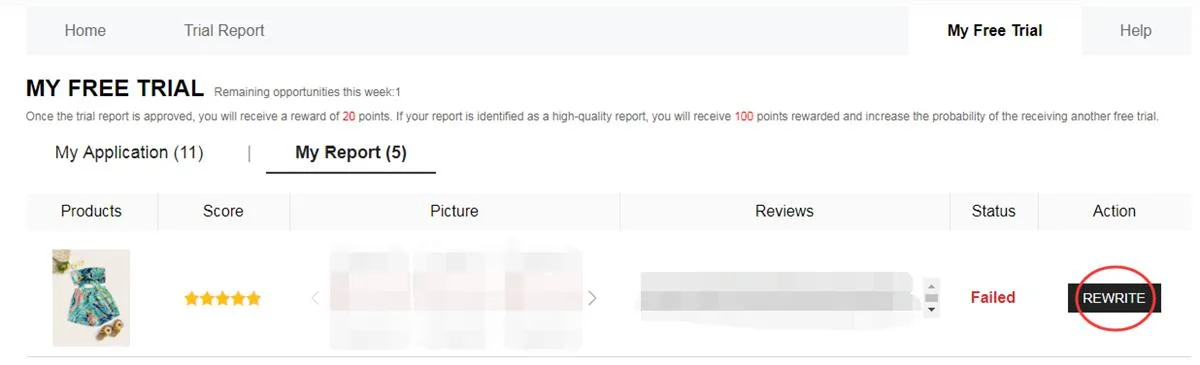
Rewrite available? Polish what you wrote and resubmit — done
Applying vs. reviewing — what's in between?
Phase one: scan the live campaigns and grab the products that interest you. Heads-up — the catalog rotates, so this week's options may be gone by the next cycle.
After that, the request goes under evaluation. No guarantees here — every entry depends on a result that shows up on your dashboard further down the line.
Approved? The item heads to the address you registered. Delivery kicks off the hands-on phase — explore each feature of the product properly.
Last leg: submit the report. Beat the deadline — and write something genuinely helpful, in your own voice, with photos that show the real item.
Campaign categories to watch for
Stock levels drive what's featured each cycle, though these groups tend to appear:
- Clothing: dresses, T-shirts, blouses, denim, sportswear, outerwear and more clothing.
- Beauty and care: cosmetics, skin treatments and everyday personal-care picks.
- Accessories: bags, shoes, trendy extras, jewelry and assorted style accents.
- Home and organization: cookware, decorative accents, storage solutions and goods for the whole house.
A miss last round says nothing about how future requests will turn out.
Pro tip: treat every new cycle as a fresh shot — review your details and submit a complete application.
Want a review that actually helps?
Skip the bare yes-or-no verdict. Smart move — pack in concrete details from real use:
• Highlight the strengths — and flag anything that fell short.
• Cover fit, material, finish, comfort and real-life appearance.
• Use original, well-lit photos from angles that show the product properly.
• Write insights a fellow shopper comparing this item would value.
Mistakes that cost you spots
Pro tip: run a quick check at the end of every step to sidestep these pitfalls:
❌ Incomplete or outdated profile information.
❌ A delivery address that falls outside the chosen store's region.
❌ Committing to an item without confirming the size and listing details.
❌ Filing a thin report that skips how the product performed in real use.
❌ Blurry, dark or unclear photos that hide the actual item.
❌ Missing the review deadline — up to 10 days, no extensions.
❌ Ignoring Rewrite when it's available to repair your report.
❌ Submitting info that conflicts with what the program actually requests.
Core rules — quick recap
• Up to 3 applications per week, max — and unused slots disappear at the end of each cycle.
• Heads-up — your address needs to fall within the store's own country or region.
• Standard delivery is covered — heads-up, though: customs charges and regulations vary by destination.
• After delivery, the clock starts — finish and submit the mandatory report before it runs out.
• Rejected review? The Rewrite option may appear, letting you revise it for another check.
• Fake information or account abuse may trigger restrictions — or a block from future campaigns.
• Completing every step and delivering your reports is simply part of the deal for trial members.
Shopper FAQ: The Quick Answers
Will applying cost me a single cent?
Zero cost to request items in the Free Trial Center. Heads-up, though: applying is no guarantee of selection.
How many picks per week — max?
Max of 3 products per weekly cycle — and leftover slots disappear rather than carrying into the following week.
Can a single rejection block future requests?
Nope. A declined entry applies to that campaign only. Watch for fresh campaigns and apply again as new products open up.
Is my review in need of a fix?
Head to My Report. Status reads Failed and Rewrite is available? Edit the content and resubmit — simple as that.
Need the full breakdown, step by step?
Learn to navigate the Free Trial Center, track each application and craft a strong review if selected.


